
Meta Ads Audit · for Shopify brands
Find the Meta ad spend you are wasting
A score out of 100, the spend being wasted, what to pause and what to scale, and your three biggest issues, with the numbers behind each one.
- Runs inside the Monastic Media app for Shopify.
- 8 checks, from wasted spend to hook rate, on your own numbers.
- No password to share. You read it in your own Shopify admin.
Made by Monastic Media, a performance marketing agency in Surat that runs Meta ads for D2C brands.
How you get it
Install it on the Shopify App Store
Install the Monastic Media app on your store, open the audit inside it, and read your score.
Connect your Meta ad account with Facebook login inside the Monastic Media app (read-only, no file needed).

The audit runs inside the Monastic Media app for Shopify. The app is in Shopify’s App Store review since 11 Oct 2026. This button opens the listing the day Shopify approves it.
Shopify is reviewing the app version that carries the audit. This button opens the listing the day it is approved.
Why brands run it
Built for three common problems
“My CPM keeps going up and I can't tell which ad is tired.”
The fatigue check flags ads whose link CTR fell 30% or more, or whose CPM rose 25% or more, since their first days of delivery.
“I spend every day but I don't know what to pause.”
The wasted spend and pause checks find ads that spend without results. Pause calls only name ads that are still running.
“I don't know which ads deserve more budget.”
The scale check names the ad sets clearly beating your average, with enough spend to trust it, and how much more to give them.
What you get
Your audit, in plain numbers
- A score out of 100 and a band Strong (80 and up), Fair (60 to 79), Weak (40 to 59) or Poor (under 40).
- The spend being wasted Ads that spent twice your cost per result with no result, and ads costing more than twice your average.
- What to pause and what to scale Named ad by ad and ad set by ad set, only ones still running.
- Your three biggest issues Each with the numbers behind it, worked out from your own ad account.
- The full report Every ad behind each finding, your top actions in order and where to move budget.
How you get it
Three steps, inside Shopify
- 1
Install the app
Find the Monastic Media app on the Shopify App Store and install it on your store.
- 2
Open the audit
It sits inside the app, in your own Shopify admin.
- 3
Read your score
Your score, the spend being wasted and your three biggest issues, with the full report one tap away.
A real example
We ran our own ad account through it
Day-by-day data from 5 Sep to 4 Oct 2026, with ad names replaced by generic ones.
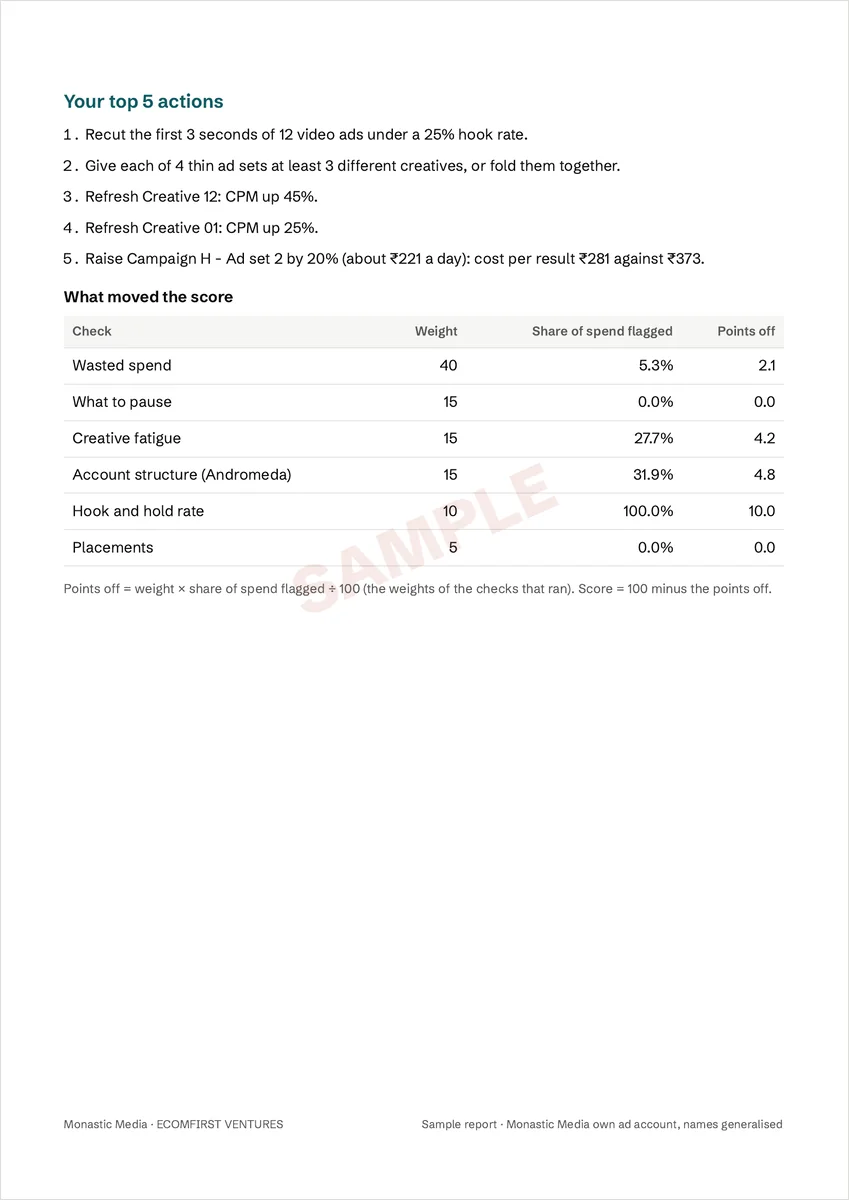
79out of 100 · Fair
All 8 checks ran. The three biggest issues it found:
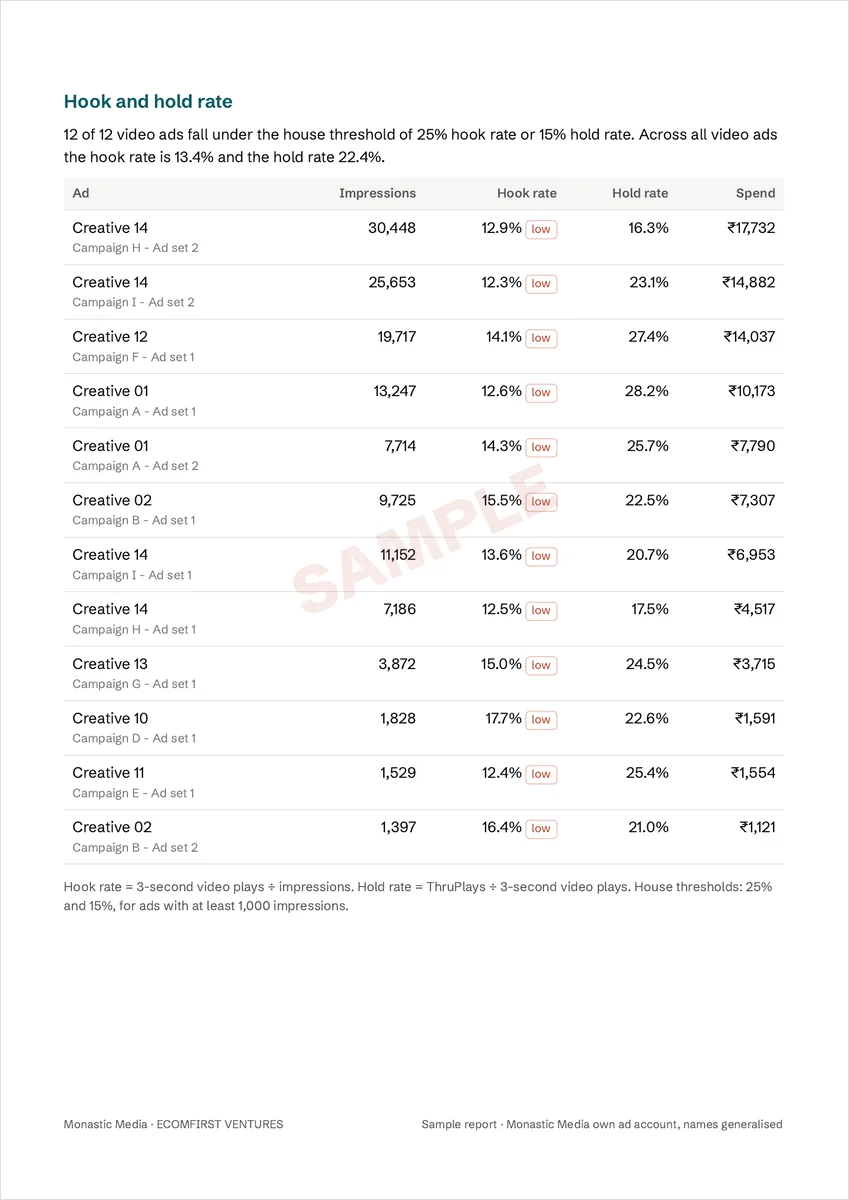
- 12 video ads lose viewers in the first seconds. One has a 12.9% hook rate against our 25% house threshold.
- Structure works against Andromeda. All 4 live ad sets run fewer than 3 creatives, and 8 ads are copies of 3 creatives.
- 2 ads show creative fatigue. On one, CPM rose 45% between its first and last 5 days of delivery.
Our account runs for booked calls, not online sales, so it is judged on results, not ROAS.
Full report
Every ad behind your score
An 8 to 16 page report. Every number in it comes from your own ad account and is checked before you see it.
- Every ad behind each finding, and your top actions in order
- Budget moves from your weakest to your strongest ad sets, capped at 20% each, in rupees a day
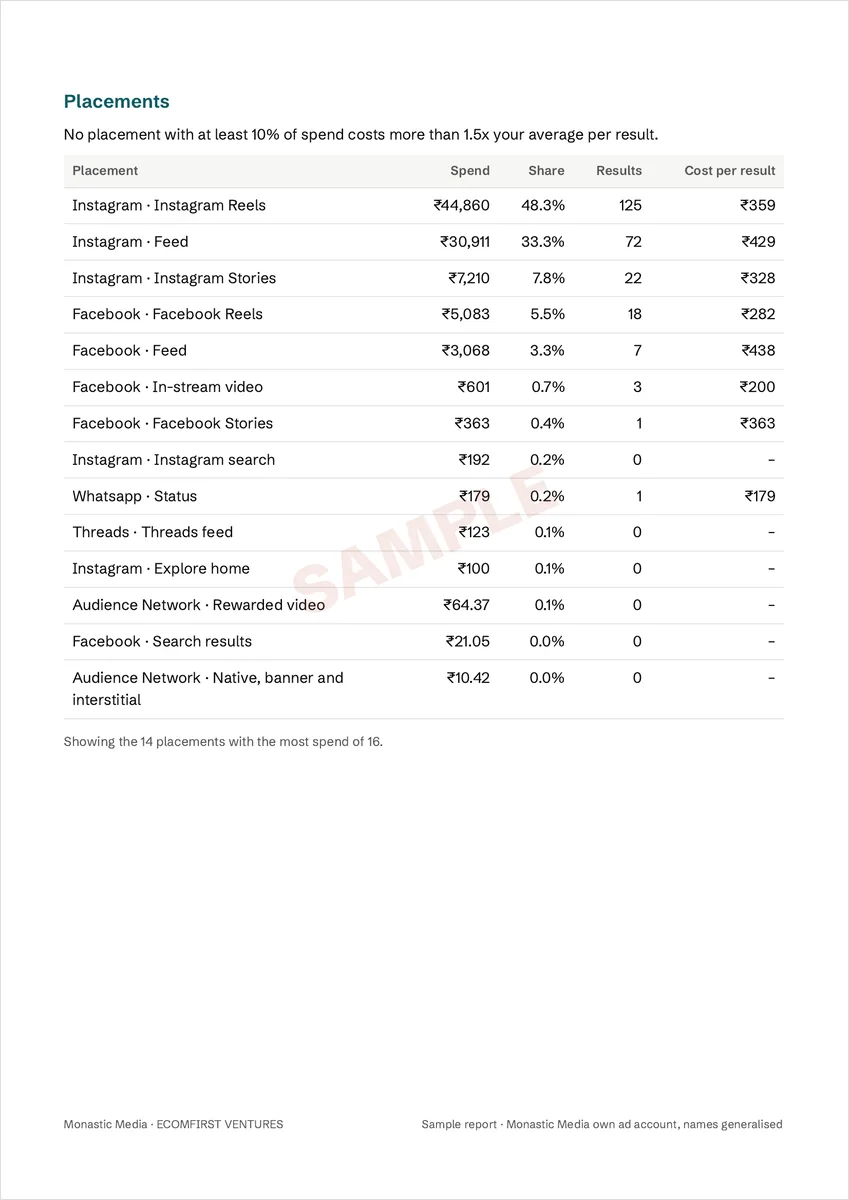
- Fatigue curves per ad, structure, hook and hold rates, and placements
- How each number was worked out, with the house thresholds printed
Questions
Before you install
Where do I get it?
Inside the Monastic Media app for Shopify. Install it from the Shopify App Store and open the audit in your Shopify admin.
Do I have to share a password?
No. You read the audit inside your own Shopify admin, and nobody asks for your Meta password.
Will someone call me?
No. Nobody calls unless you choose to book a call.
My account is small or new. Will it work?
It works on what your account has. A check without enough data is skipped and says so.
My store is not on Shopify.
Write to support@monastic.media and we will help you run it.
Who made this?
Monastic Media, a performance marketing agency in Surat that runs Meta ads for D2C brands.
Get your audit
Install the Monastic Media app on Shopify and read your score inside it.